Madhavi Chandra, Director of Informer Product Management, shares development details on our upcoming release Informer 5.4!
It’s coming! Informer 5.4 is currently in release process mode and will be officially released in Q2. We have many new features that will bolster data governance and business workflows. You’ll find a new Field Security model that allows for granular field level security – you can restrict and grant differentiated access to fields within the same Mapping. Sharing a Dataset will now provide row level and field level restrictions for more robust security. The new security features are backwards compatible with previous versions of Informer.
The new Elastic Script Fields allow you to augment your Dataset without requiring the data to be re-indexed. Think of Elastic Script Fields as a post-Elasticsearch calculated column. You can now easily do calculations like ‘As of’ a specific date with fast performance.
Interacting with large amounts of data can be challenging. We improved column selection across the board so you can quickly navigate, find a field, and pare down the view by dynamically choosing fields that you wish to see.
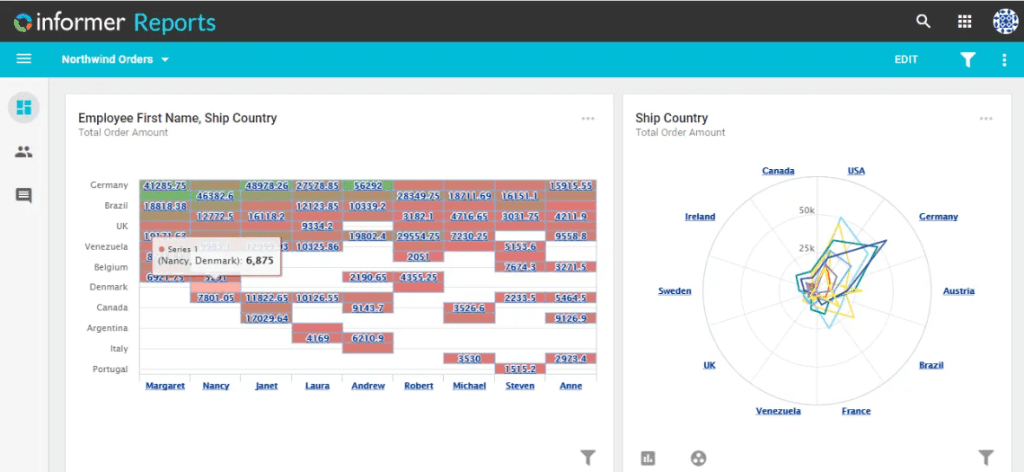
You’ll also find two new Visuals in our Visual Gallery, Heat Map and Spider Chart, increasing the number of ways that you can visualize your data.
We have two impactful features behind an experimental flag – Templates Preview and a new Web Datasource driver.
Templates Preview allows total pixel-perfect control over output. You can create the exact layout you desire using HTML with server-side rendering. This mode allows for complete flexibility in designing a Template. Future features for Templates will include different modes for customizing existing PDF exporter and other tailored Template experiences.
The Web Datasource driver connects Informer 5 to web-based tools, opening the door to limitless possibilities. At Entrinsik, we have utilized the driver to connect Jira Software to Informer 5 to aid in the efficiency of our developmental process. Connect the Web Datasource to one of your web-based tools and see the insights you can extract.
With so much in Informer 5.4, it’s no wonder we are excited to release it to you soon.
Robin Lamb, Director of Informer Client Services, shares invaluable tips on Informer 4 maintenance and clean up.
Winter has ended and it is time for some spring cleaning. We all know that the value you can drive from reporting is a direct result of the quality of the data. So, in addition to the tiding up around the office or home, lets also take a few minutes to tidy up Informer with these three easy steps.
Link Audit for mismatched Field Types in U2 Datasources
Mismatched field types can create numerous problems within Informer including data holes and reporting errors. This simple report can identify and fix all mismatched fields within your Informer instance to assist with a clean mapping migration.
Clean up to prepare for Informer 5 migration.
Spring is also a great time to migrate and unlock the performance of Informer 5. In order to make sure you are ready for the move we have developed a couple of reports that will automate your preparation.
Link Audit Report – Use this report to help diagnose problems with migrating to Informer 5. It will diagnose which links need to be fixed before the migration.
Audit Reports – These 4 reports will help you analyze which reports use calculated expressions, aggregate columns, aggregate or sub select conditions in the reports. Some of the features will not translate into Informer 5 in the same format. You may need to tweak the reports once they are imported into Informer 5. Running these reports will identify possible issues and help you plan your migration.
Chris Reeves, VP of Informer Partnerships, explores the benefit of using third party tools to enhance Informer 5.
Our clients and partners have found many use cases for incorporating Google Maps with geotag data into Dashboards and Reports. There are police departments looking at crime incidents and how they’re concentrated within specific locales. Municipalities can also analyze car accidents and how to better traffic patterns. Distributors can optimize the product flow of their supply chain. Informer’s pluggable architecture provides limitless potential in utilizing location data with out-of-the-box functionality and third-party tools.
Informer comes with a Flow Step called “Zip2Geo.” This allows users to reference zip codes to generate an average latitude and longitude for each row of data. This then gets plotted onto a Google Map highlighting concentrations with colors and markers. To map individual addresses with their coordinates, we looked at third party tools and created a plugin and Flow Step using Geocodio’s API.
In my Informer instance I also have the Google Maps Plugin installed. This plugin enables full use of embedded Google Maps inside Informer. To use this plugin you must obtain a Google Maps API Key found here. Note there is a potential cost associated with the Google Maps API Key, but it only kicks in with enormous volume requests.
For this demonstration, I found a dataset containing the street addresses of nearly 2000 McDonald’s restaurants. Once loaded as an Informer Dataset, we can begin to process the addresses.
The Geocod.io plugin injects a new Flow Step into Informer. Simply add the new Geocode Flow Step to your Dataset and identify the column containing full street address data. The Flow Step will POST those addresses to the Geocod.io API and in return populate your Dataset with new columns containing associated latitude and longitude.
The Geocod.io Plugin injects a new Flow Step into Informer
The Geocod.io Flow Step populates the dataset with new columns, one of which is the latitude and longitude of the provided address
Informer recognizes the latitude and longitude column as being a datatype of Location, and the Google Maps visual accepts the Location datatype to generate a Google Map with Location markers. You can now zoom into a Google Map, click a marker, and choose to view with Google Street View!
Have a look for yourself and find your local McDonald’s. Drill down into the dashboard, click on a marker and select “Street view” for a fully interactive street view of that location. I’ve created the visual and included it in a dashboard:
The Google Maps Visual accepts a Dataset field with a Location data type
The Geocod.io Plugin and Google Maps Visual produce a Google Map with street view level accuracy
Geocodio is one of many such geotag services available online. We chose to use it here because they offer a reasonably high volume of free lookups per day – currently 2,500. So it works well for demonstration purposes. But Informer can easily support other services in the same way and achieve the same result. If your organization is interested in learning more, get in touch with the support staff at i5support@entrinsik.com and we’ll discuss details.
In this series we sit down with Regina Lopez, our Informer Customer Success Manager. Regina has extensive experience using Informer in a Colleague environment as well as supporting our Colleague users and has all the tips you need to streamline your processes.
Covered in this article:
Informer works natively with Colleague’s UniData database for easy ad hoc reporting
Complements Colleague processes to enhance efficiency via savedlists and automations
Take advantage of Mapping Suites for easy reference to FA ACYR and GL FYR files
Informer is a data analytics platform that allows for the blending of disparate data sources for the creation of accurate, self-service reports and dashboards that help organizations with tasks from operational reporting to high-level strategic analysis. It is a powerful tool that connects to legacy systems as well as SQL databases and hosted applications (via web APIs). As a company, we have long-time experience with the Higher Education community and have been working with and supporting Colleague users since 2006.
Colleague was initially developed with an underlying UniData (MultiValue) database. Informer actually preserves specific MultiValue functionality such as one-to-many relationships presented in rows and columns, by-exploding, and savedlists. In Informer, users are able to generate savedlists that can be utilized within the Colleague application for different processes. Data populates into the Colleague screen or custom program to take specific actions. For example, users often need to print batches of student transcripts. Informer can run a report of students matching certain criteria and create a savedlist of those IDs to populate in the TRAN screen. Transcripts will be generated for all students selected, with no need to type the individual IDs. Users can also create savedlists in Colleague and use the savedlist to generate reports against the records included, demonstrating the bidirectional functionality of Informer and Colleague. Informer provides a high degree of flexibility with existing Colleague processes to enhance efficiency and take advantage of automation, allowing users to save a significant amount of time.
We understand the challenges that come with the daily demands of operational reporting. Informer was top-ranked for “Ad Hoc Query” in the BARC BI & Analytics 21 survey, and 97% of our customers use our software for this purpose. Informer offers unlimited reporting abilities with intuitive drag-and-drop functionality, drilldown capabilities, real-time data rendering along with scheduling reports.
For example, our customers use the Jobs functionality to schedule reports and to help automate the Financial Aid awarding process by querying the database to find students that are ready to be awarded. Financial Aid advisors are emailed a list so that the awarding process can begin. Jobs can also be used to create quality control reports to find missing data and alert the respective office to ensure data integrity. An example of this is finding students with missing birthdates to verify this data is collected and updated in the database. Another use case for Jobs is generating nightly files to push data to other third-party systems via a secure FTP.
Our software offers native support for specific Colleague functionality. Users can create reports using Informer’s Mapping Suites for Financial Aid ACYR files and General Ledger FYR files. These reports only need to be created once and can be used repeatedly for all years that have been set up. Informer can prompt the user for the year or use a default year. Users can also run reports displaying data from multiple ACYR years.
Informer also includes the ability to map Colleague Valcode tables and Code Files through the use of Codes. Codes are code/description pairs defined for a specified property and can include Ellucian delivered Valcodes and Code Files as well as user defined codes, as needed.
Regina Lopez
For more ways on how Informer can work with Colleague and become your institution’s data hub, contact Regina Lopez at regina@entrinsik.com.
If you’re a new customer, we have bundles available for UniData and SQL with pre-built mappings and links (joins) to the most commonly used files (tables) in Colleague as well as basic reports.
In this series we sit down with Madhavi Chandra, Director of Informer Product Management, as she gives us the development details starting with our most recent release Informer 5.3!
As a Product Manager, the question of how we can improve our customers’ experience is consistently top of mind. We always want to make things more efficient and eliminate pain points for our users. In Informer 5.3, one topic we focused on was enhancing the user experience with additional options for exported output and incorporation of automation intelligence for imported spreadsheets.
Madhavi Chandra
One of the biggest challenges we hear from our customers is presenting management with impactful reports to glean business insights and draw smart conclusions. For this release, we took a key pillar of Informer, the ability to digest and interact with data easily and improved the user experience when grouping rows-and-columns data (e.g. page break per group) in various output options. With these enhancements, the data is easily identifiable and presentable whether interacting with it on the screen, exporting to PDF or sharing in an email, accomplishing our goal to make data apparent and shareable throughout an organization, and enabling customers to make informed decisions.
We know that data lives everywhere, on spreadsheets, in databases, or on 3rd party applications, and that Informer 5 is the melting pot that allows customers to blend data across all platforms. Many of our customers are exporting data from 3rd party applications and importing into Informer to report and build visualizations. We wanted to bolster this process and make creation of CSV derived Workspace Datasources even more seamless. We added behind-the-scenes intelligence to complete tasks such as matching column headers in the new CSV file with existing fields already in the Workspace and choosing the appropriate data type for a field. Whether CSV data is output from a 3rd party application or siloed data that lives on spreadsheets, these Workspace enhancements save valuable time and bring more efficiency to a common user workflow in Informer.
For a complete list of additions, check out release notes here.
Entrinsik is thrilled to announce Informer’s exceptional performance in the BI & Analytics Survey 21 from BARC. This is the world’s largest and most comprehensive survey of business intelligence end users, based on feedback from a diverse group of 2,500+ where 36 crucially important criteria were evaluated for 33 products.
Informer stood out when it came to KPI results, scoring 38 top rankings and 40 leading positions in 4 different peer groups, those being dashboarding-focused products, ad hoc reporting-focused products, self-service analytics-focused products, and Americas focused vendors. 100% of surveyed users said they would recommend Informer, and 100% of surveyed users also reported they are satisfied with Informer. Informer was even awarded the best price-to-value in the entire survey.
According to BARC, “Informer’s price-to-value ratio is an attractive selling point for the tool. Informer comes out on top of all four of its peer groups. Such exceptional scores attest to fair pricing for the product and genuine continued customer satisfaction with an excellent cost-benefit ratio”. Our vendor support was top-rated as well with BARC noting, “When it comes to vendor support, customers rave about their experiences with Entrinsik”.
Some of the KPIs that Informer outperformed the competition in included:
Ad hoc Query – 97% of our customers use Informer for this purpose, as it is intuitive and fast.
Customer Satisfaction – With 100% satisfaction, it is clear that we provide excellent service and value.
Data Preparation – We achieved a perfect score for this criteria, which is critical for accurate analysis.
Ease of Use – 97% of our customers agree that ease of use is the great strength of Informer.
Implementer Support – No stress implementation is fast and flexible.
Operational BI – Successful day-to-day reporting and dashboarding tasks with real-time data.
Price to Value – Fair pricing and consistent performance earned us the best ranking in the survey.
Vendor Support – We provide a comprehensive support center and a top-notch support team.
It was an honor to be recognized for many of these features. Be on the lookout for a more in-depth review of the above KPIs and how Informer can help benefit your organization.
Inability to Analyze Data for Timely Decision-Making
No Comprehensive View of Data from Multiple Businesses
Missing Modern Analytics Environment
Results
Curated Reports Created from Numerous Data Sources
Limitless Data Exploration for Non-Technical Users
Analysis of Inventory Data at Consistent Time Intervals
The crown jewel of Informer is the Discover feature which enables people to easily explore data on their own.
Business Intelligence Director
Privately Held Wholesale Distributor
Explore Your Data
The privately held wholesale distributor uses Informer’s visualizations to drill-down into the details behind the data. If you want to discover new data insights, then book your demo of Informer, the top-rated business intelligence platform.
Self-Service Reporting Impossible for Non-Technical Users
Challenges with Data Integrity and Security
Results
Creation of Data-Driven Decision-Making Environment
Improved Management of Course Schedule
Time and Money Savings College-Wide
We were able to create reports in the first week.
Hanumant Borate
Passaic County Community College
Ensure Data Accuracy
Passaic uses Informer to ensure their data is accurate and secure. If you want to know you can rely on your data, then book your demo of Informer, the top-rated business intelligence platform.