

You’re mapping the data. You’re inventorying the integrations. You’re scheduling the training sessions and picking a go-live date. Your Ellucian SaaS migration plan is coming together.
Now ask yourself one question: when you flip the switch, will your reporting miss a beat?
Because your IR team has spent years building the Datasets, Reports, Templates, and Dashboards that keep your institution running. Enrollment snapshots for the cabinet. IPEDS submissions. Financial aid compliance pulls. The ad hoc requests that land in someone’s inbox every Monday morning. All of it lives in Informer, and none of it appeared overnight.
So how do you make sure those assets keep working the moment your SIS moves to the cloud?
The Hidden Migration That Could Derail Your SaaS Transition
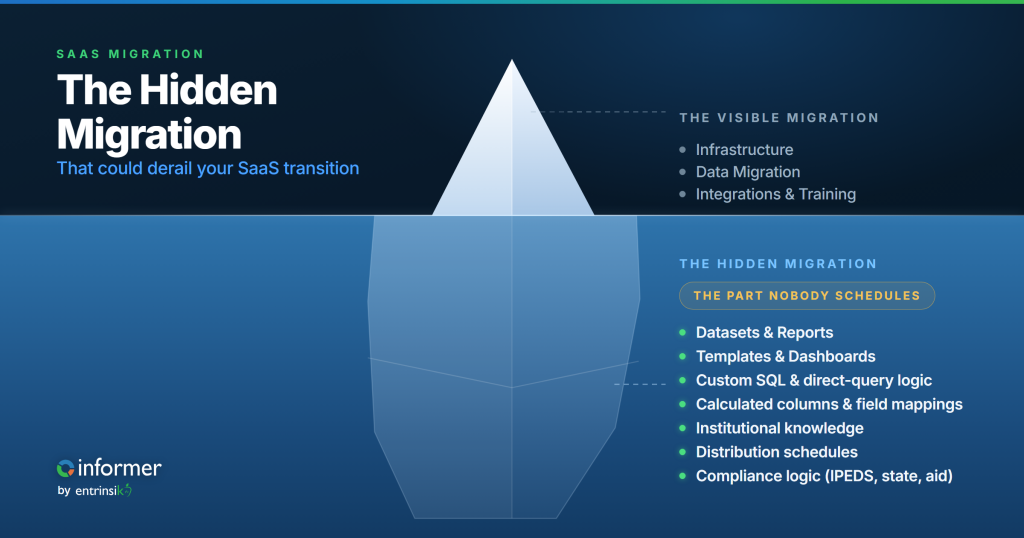
Every SaaS migration is really two migrations. There’s the one on the project plan: infrastructure, data, integrations, training, go-live. Ellucian publishes detailed guidance for it. Implementation partners bring playbooks. Your IT team runs workshops. The focus, rightly, falls on getting your Banner or Colleague data into the new environment, reconnecting third-party systems, making sure financial aid disbursement doesn’t break mid-cycle.
Then there’s the one nobody scheduled: your reporting layer.
It doesn’t show up in the critical-path conversation because it doesn’t feel like infrastructure. It feels like something people will “figure out after go-live.” And that assumption is where migrations quietly go sideways.
Your Informer Datasets, Reports, Templates, and Dashboards aren’t cosmetic. They encode years of institutional decision-making. How your registrar defines census. How your IR director reconciles IPEDS categories against your institution’s own student classifications. How your VP of enrollment reads term-to-term movement. Every filter, every calculated column, every distribution schedule reflects choices your team made, refined, and validated over dozens of reporting cycles.
That’s a second migration hiding inside the first one. And if it doesn’t land on the project plan during the planning phase, it lands on your IR team’s desk the week after cutover, with no timeline, no budget, and no margin for error.
You’re still in planning. This is when it gets added, not later.
How to Make Sure Your Reporting Doesn’t Skip a Beat
Here’s the part that should be shaping your migration plan from day one: Informer is Ellucian SaaS Verified for both Colleague and Banner, with a native Connector available in the Ellucian Marketplace. Your existing Informer assets don’t evaporate when the SIS moves.
What does that actually mean for your planning?
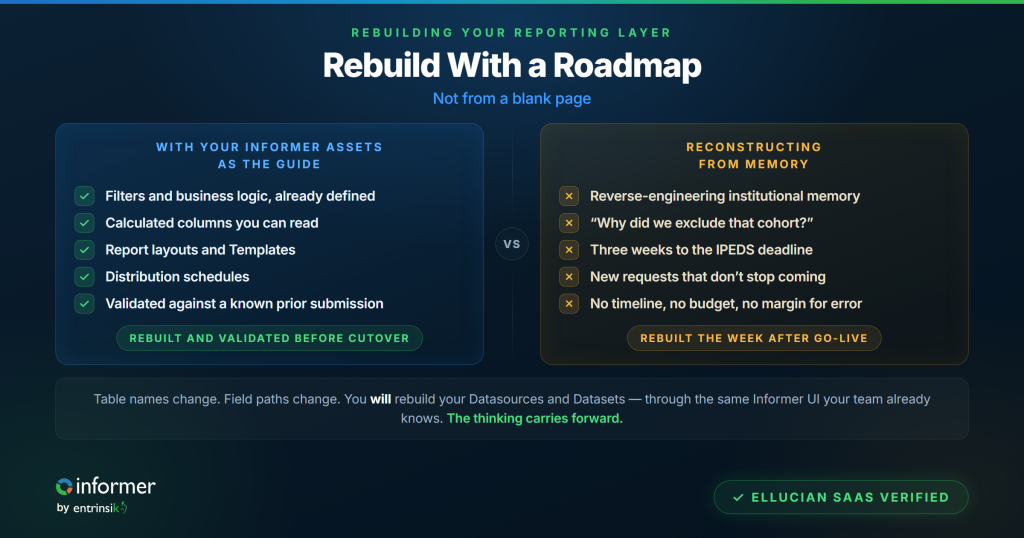
You will be rebuilding your Datasource connections and Datasets to work with the SaaS data model. That’s real work. But here’s the critical difference: all the institutional logic your team has built over the years — the filters, the calculated columns, the report layouts, the distribution schedules — that’s your roadmap. Every decision your team encoded into those Informer objects is still right there, telling you exactly what the new version needs to do. You’re rebuilding with a blueprint, not from a blank page.
So think of it as a rebuild with a roadmap, not a rebuild from memory. And that distinction makes all the difference in how much time and effort you budget for it.
The Connector gives you a direct path to your SaaS data. When Ellucian moves Colleague or Banner to SaaS, the underlying data structures shift. Table names change. Field paths change. But Informer’s SaaS Verified Connector connects directly to your new SaaS environment, and your team rebuilds Datasources and Datasets through the same Informer UI they already know. You’re not writing API calls or hand-coding integrations. You’re pointing Informer at the new data source and rebuilding your Datasets using the familiar interface, the same way you built them on-prem. The experience feels like what your team already does, just against a different back end.
What to identify now: custom SQL and direct-query logic. If your team has written custom SQL Datasource queries that reference on-prem table structures directly, flag them during planning. The SaaS environment exposes data differently than your on-prem database did. Any Dataset built on raw SQL against your on-prem Colleague or Banner database is going to need a new approach. The good news: most of the business logic in those queries (the filters, the joins, the groupings that reflect how your institution counts) translates. The connection method is what changes. Identifying these early gives you time to plan the rework instead of scrambling through it.
The years of institutional knowledge baked into your Informer layer still travel with you. The thinking carries forward. This is the difference between a migration plan that accounts for reporting and one that doesn’t. One team rebuilds with a roadmap. The other reconstructs from scratch.
What Reconstruction Actually Costs When You Don’t Plan
Let’s be specific about the cost of leaving reporting off the plan, because “it’ll take a while” undersells the damage.
Think about your IR office. How many standing Reports does your team maintain? How many go to the cabinet, the board, state agencies, federal compliance? Each one encodes decisions: which students to include, which terms to compare, how to handle dual enrollment or consortium agreements. That logic isn’t documented in a manual somewhere. It lives in the report itself and in the head of whoever built it.
When that person has to start from scratch in a new environment, they’re not just rebuilding a report. They’re reverse-engineering institutional memory. And while they’re doing that, they’re not answering the new requests that don’t stop coming just because you migrated.
Take a concrete example: your fall IPEDS Enrollment survey. That Report probably pulls from multiple Datasets: one for the student population as of your institution’s official census date, another to classify students by attendance status, level, race/ethnicity, and gender using your institution’s specific logic. Maybe you’ve got a calculated column that flags first-time degree-seeking students based on how your registrar defines “first-time” (which may not be exactly how IPEDS defines it, and your team built the reconciliation logic years ago). The Template formats everything into the Part A grid the way your IR director needs to review it before uploading to the IPEDS survey portal.
In a planned migration, that IPEDS Report gets rebuilt using the existing logic as your guide. The field references get updated to match the SaaS data model. You run validation against a known prior submission to confirm the numbers match. Your team does this during the migration window, not during the October reporting crunch.
In an unplanned one? Your IR director is rebuilding that student classification logic from memory three weeks before the IPEDS keyholder deadline, trying to remember why they excluded a particular cohort two years ago. That’s not theoretical. That’s a Tuesday in October.
Edison State’s financial aid team was stuck in a fully manual federal loan disbursement review process: five team members pulling paper files and calculating eligibility by hand over three full working days each cycle. Processing time dropped from 120 staff hours to 1 hour per cycle, a 99% reduction. They also avoided a $60,000 third-party software cost by building Ohio Financial Cost & Aid Disclosure compliance directly in Informer. That kind of institutional investment in your reporting layer isn’t something you want to rebuild from memory. It’s something you protect during migration planning.
And here’s the thing nobody talks about: your IR team is already stretched. The request volume keeps growing. The team doesn’t. Telling them to reconstruct years of reporting work on top of their existing workload isn’t a morale problem. It’s a capacity problem. People who are already running at full load don’t have weeks to spare reverse-engineering reports they already built once. The work either gets done poorly, gets done late, or doesn’t get done at all. None of those outcomes look good in a board report.
What to Put on the Plan Right Now
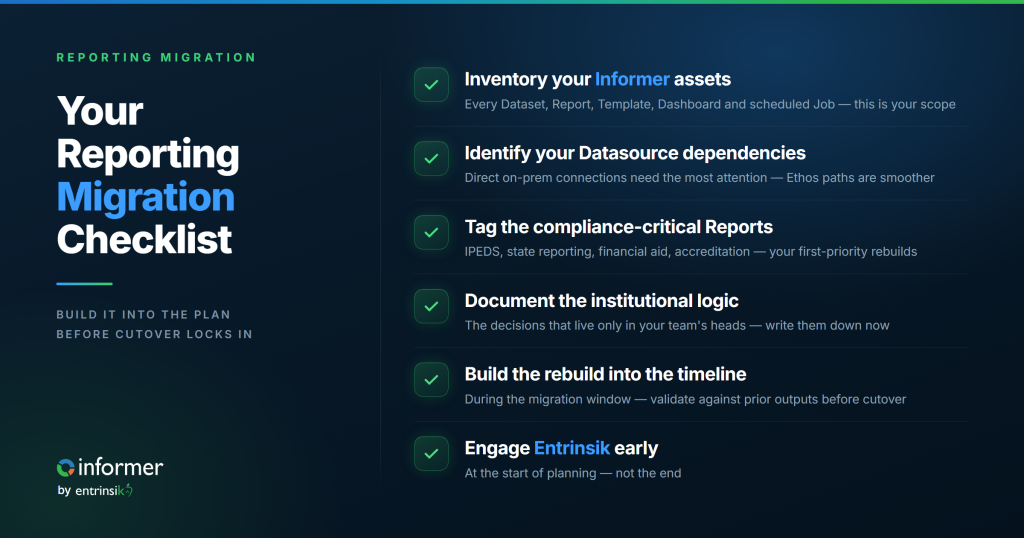
You’re still in the planning window. That means you can do this right. Here’s what belongs on the migration checklist before cutover conversations get locked:
- Inventory your Informer assets. Every Dataset, Report, Template, Dashboard, and scheduled Job. Note which ones are actively used and by whom. Flag anything built on custom SQL or direct database queries. This is your scope.
- Identify your Datasource dependencies. Which Datasources connect directly to on-prem Banner or Colleague tables? Which ones go through Ethos or other middleware already? The ones already going through Ethos may have a smoother path. The direct-connection ones need the most attention.
- Tag the compliance-critical Reports. IPEDS. State reporting. Financial aid compliance. Accreditation. These have hard deadlines that don’t move because your SIS did. Know exactly which Reports serve these purposes and make them first-priority rebuilds.
- Document the institutional logic that lives only in your team’s heads. Why does this calculated column exclude summer-only students? Why does that filter use a specific date range instead of the standard term dates? When you’re rebuilding with your existing Informer assets as the roadmap, you want those decisions written down, not assumed.
- Build your Informer rebuild into the migration timeline. Not after go-live. During the migration window. Give your team parallel access to the SaaS environment early enough to rebuild and validate Datasources, Datasets, and Reports before cutover. Run the numbers against known prior outputs. If your IPEDS Report produces different results in the new environment, you want to find out in June, not October.
- Engage Entrinsik early. Informer’s SaaS Verified status and native Connector exist precisely for this migration path. Your Entrinsik team can help you scope the rebuild, identify which assets need the most rework, and plan the transition alongside your implementation timeline. That conversation is better at the start of planning than at the end.
The Reporting Layer Isn’t an Afterthought
Your Informer layer represents years of institutional thinking made operational. The good news is that thinking doesn’t disappear in a SaaS migration. The Datasets, Reports, and Templates your team built are the roadmap for rebuilding in the new environment. Informer’s SaaS Verified Connector gives you a proven path to your Ellucian SaaS data.
But only if reporting is on the project plan. Right now. Not after go-live, not during the first compliance deadline, not when someone asks “where did that enrollment report go?” and nobody has an answer.
Add the line. Your IR team will thank you.
Ready to plan your Informer migration path? Talk to Entrinsik about scoping your reporting rebuild before your SaaS cutover date locks in.